Blog › Digital Sovereignty
Are Your iPhone Photos
Actually on Your Phone?
If “Optimise iPhone Storage” is turned on, your full-resolution photos are not on your iPhone. They are on Apple’s server. Here is how to check in 30 seconds.
By PM Project Change · 5 min read
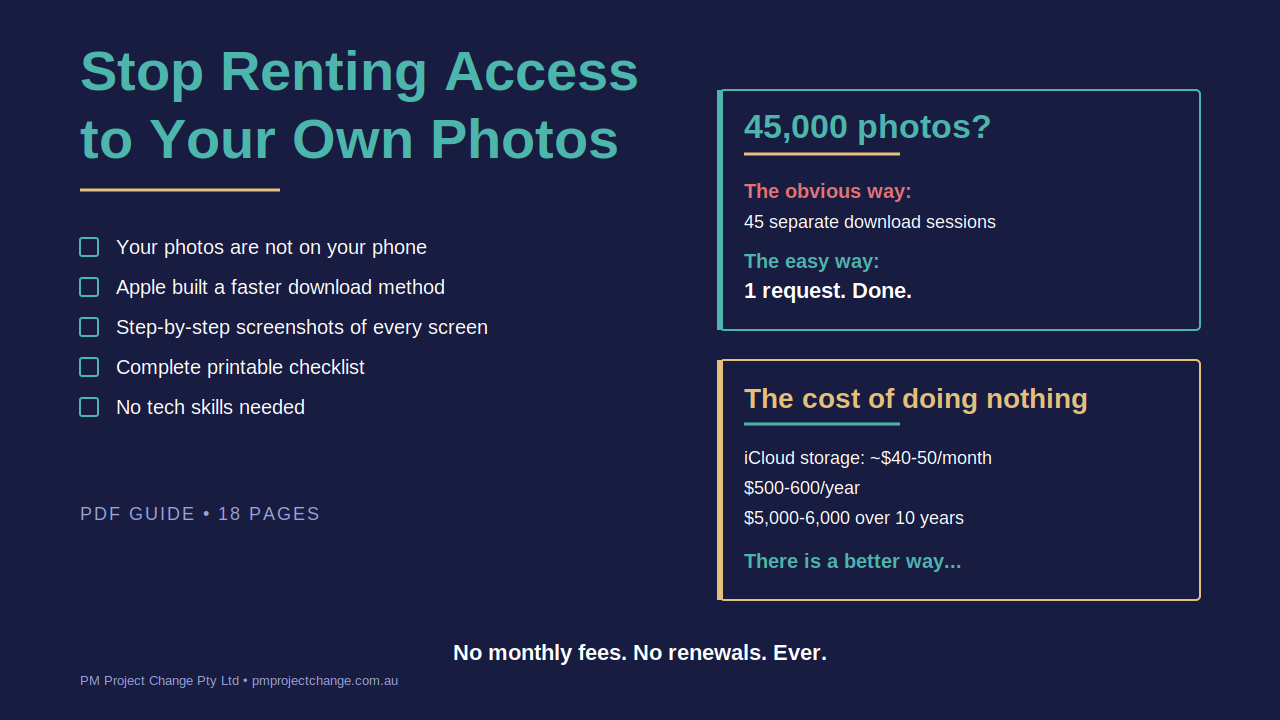
Most iPhone users do not realise this.
If “Optimise iPhone Storage” is turned on in your settings, and it is turned on by default for most people, the photos on your phone are not your photos. They are tiny previews. Thumbnails.
The full-resolution originals are sitting on Apple’s server in a data centre. You are paying a monthly subscription to access them.
Check right now in 30 seconds
Open your iPhone and follow this path: Settings > tap your name > iCloud > Photos.
Look at which option is selected.
If it says “Optimise iPhone Storage” then your originals are not on your device. Your phone is showing you compressed previews to save space, and the real files live on Apple’s infrastructure.
If it says “Download and Keep Originals” then the originals are on your phone, but they are also in the cloud. You are still paying for iCloud storage every month, and you do not have an independent backup.
Why this matters
Five risks that most people do not think about until it is too late.
- Price increases. Cloud subscriptions always go up. What costs $15 a month today could be $25 tomorrow. Over 10 years, that is $3,000 to $6,000, just to access photos you already took.
- Account lockouts. Forget your password or lose access to your verification device and your account is locked. So are your photos.
- Service outages. Data centres go offline. When they do, your photos are temporarily inaccessible. You cannot download, share, or even view them.
- Terms of service changes. The company storing your photos can change the rules at any time. You agreed to terms most people have never read.
- Catastrophic events. Data centres can be physically damaged or destroyed. Floods, fires, and conflict zones are not hypothetical.
The maths
Most people who try to download their photos from iCloud do it the obvious way, through iCloud.com in a browser. The problem is it only lets you download 1,000 photos at a time.
If you have 45,000 photos, that is 45 separate download sessions. Selecting, downloading, unzipping, checking. Repeating 44 more times.
There is a much faster way. Apple built it themselves. Most people just do not know it exists.
The smart way: Apple’s privacy portal
Apple operates a privacy portal at privacy.apple.com where you can request a complete copy of your iCloud data, including every photo and video at full resolution, in a single bulk request.
You submit one form. Apple emails you when your files are ready, usually within 7 to 10 days. You download a few large ZIP files. Done.
It is free. It is official. And because it is built by Apple, you never share your password with a third-party app.
After the download: where do the photos go?
Getting the ZIP files to your computer is only half the job. You need somewhere to put the photos. Long-term. Reliably.
For most people, a portable USB hard drive is the right answer. 1TB or 2TB. Brands like Seagate, Western Digital, or Samsung. Around $90 to $140 AUD for 2TB. Plug it in. Drag the photos across. Eject safely. Label the drive with the date. Store somewhere safe.
No subscription. No monthly fee. Replace the drive every 2 to 3 years and you are sorted.
The numbers that matter
- iCloud storage: $40 to $50 per month for photos, files, and music
- Annual cost: $500 to $600 per year
- 10 year cost: $5,000 to $6,000, just to access photos you already took
- External hard drive: Under $140 AUD. Once. No renewals.
- Break-even: Approximately 4 months
What you can do about it
We have written a step-by-step guide that walks you through the entire process, from checking your settings to downloading every photo to verifying your backup. 18 pages, full-colour screenshots of every screen, and a printable checklist.
No technical background needed. No apps to install. No subscriptions to sign up for.
Stop renting access to your own photos
How to Download All Your Photos from iCloud (the Easy Way). 18 pages, full-colour screenshots, printable checklist. Your photos. Your memories. Owned by you.
Launch price - then $29 AUD · 60-day money-back guarantee
Frequently asked questions
Where are my iPhone photos actually stored?
If Optimise iPhone Storage is turned on, your full-resolution photos are stored on Apple’s data centre servers, not on your iPhone. Your phone shows compressed thumbnails to save local storage space. The originals only exist in iCloud, which you pay a monthly subscription to access.
How do I check if my photos are on my iPhone or in the cloud?
Open Settings on your iPhone, tap your name at the top, then tap iCloud, then Photos. If Optimise iPhone Storage is selected, your originals are in the cloud. If Download and Keep Originals is selected, your originals are on your phone but also still in iCloud.
What is the fastest way to download all photos from iCloud?
The fastest way is to use Apple’s privacy portal at privacy.apple.com to request a complete copy of your iCloud Photos. You submit one request and Apple emails you when your files are ready in 7 to 10 days. This is much faster than downloading 1,000 photos at a time through iCloud.com.
Why does iCloud only let me download 1,000 photos at a time?
iCloud.com has a built-in limit of 1,000 photos per download session. For a library of 45,000 photos, this means 45 separate sessions of selecting, downloading, unzipping, and verifying. Most people give up partway through. Apple’s privacy portal removes this limitation by handling everything in a single bulk request.
Is it safe to use third-party apps to download iCloud photos?
Most third-party apps require you to give them your Apple ID password, which is a significant security risk. The privacy portal at privacy.apple.com is built and operated by Apple themselves, so no credentials are shared with any third party. It is the safest method available.
How much does it cost to back up photos without iCloud?
A 2TB portable hard drive costs around $90 to $140 AUD as a one-time purchase. Compared to iCloud at $40 to $50 per month, the break-even point is about four months. Over ten years you save approximately $5,000 to $6,000 by owning your own backup instead of renting cloud storage.
More from the blog
Articles on project management, change management, data governance, and digital sovereignty. Written from direct experience, not theory.
Project Governance
Why Your RAID Log Needs Three More Letters
Traditional separate artefacts work in mature PMOs. Here is how to upskill executives new to PMO without overwhelm.
All Articles
Browse the full blog
Project management, data governance, technology delivery, and digital sovereignty. New articles added regularly.