Blog › Process · Automation
A year of social media in one weekend.
1,098 posts. No agency. No burnout.
We scheduled 366 days of content across Facebook, LinkedIn and Instagram for one brand, in a weekend (okay... a weekend and a Monday). Here is the entire system: the spreadsheet, the design trick that stops it looking like wallpaper, the AI assembly line, and the two traps that would have sunk it.
 Claude
  Canva
Canva  Supabase
  Content360
  Any spreadsheet
 Here's how you do it
The whole system in seven steps
- 1 One spreadsheet. 366 rows: headline, sub-line, and a caption column per platform
- 2 One design, seven palettes. A theme per weekday so the feed never turns into wallpaper
- 3 Generate the artwork. Bulk create or AI-generate 1,098 images - with a QC pass
- 4 Host images at public URLs. A free storage bucket + a strict naming convention
- 5 One CSV per platform. Captions, dates, times and image URLs, straight from the sheet
- 6 Verify, then schedule. Health-check every URL, then bulk upload to the scheduler
- 7 Stay 20% live. The scheduled year is the skeleton - topical posts go on top
That's it. Keep scrolling for the deets... the real numbers, the real mistakes, and the live brand this system runs today.
Final result
Seven days. One design system. Zero wallpaper.
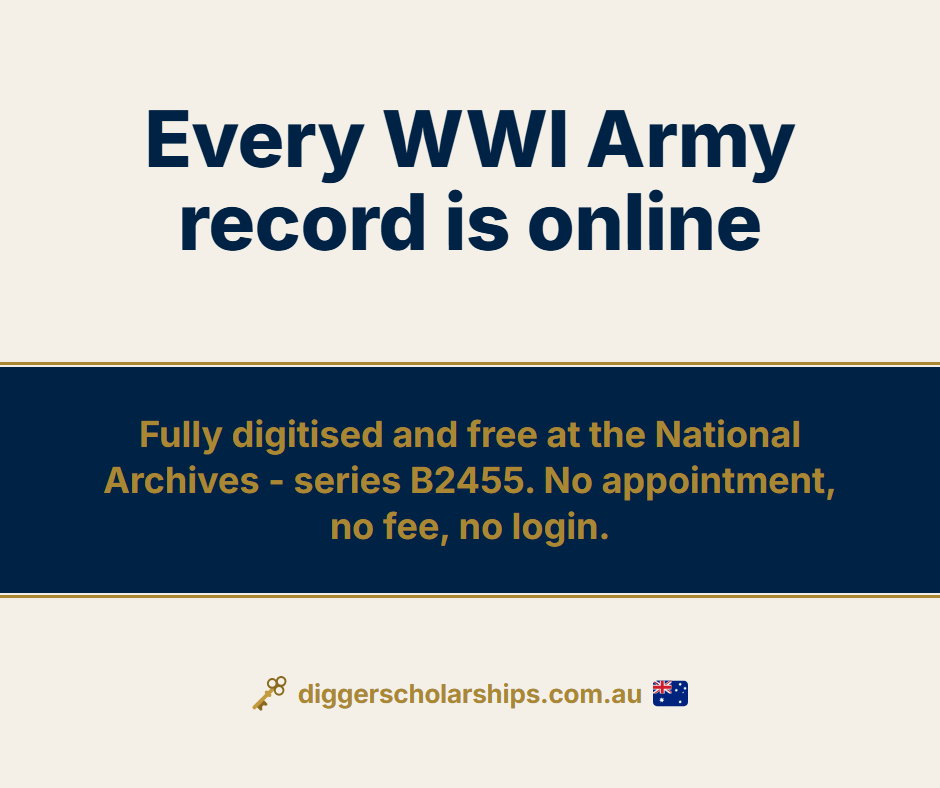
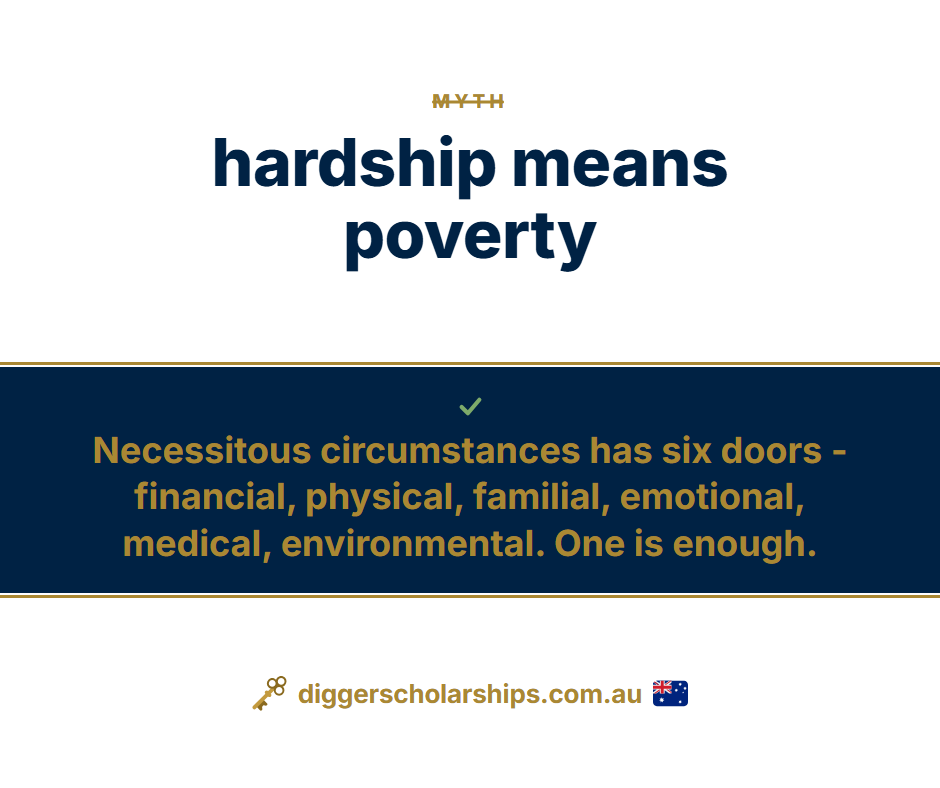
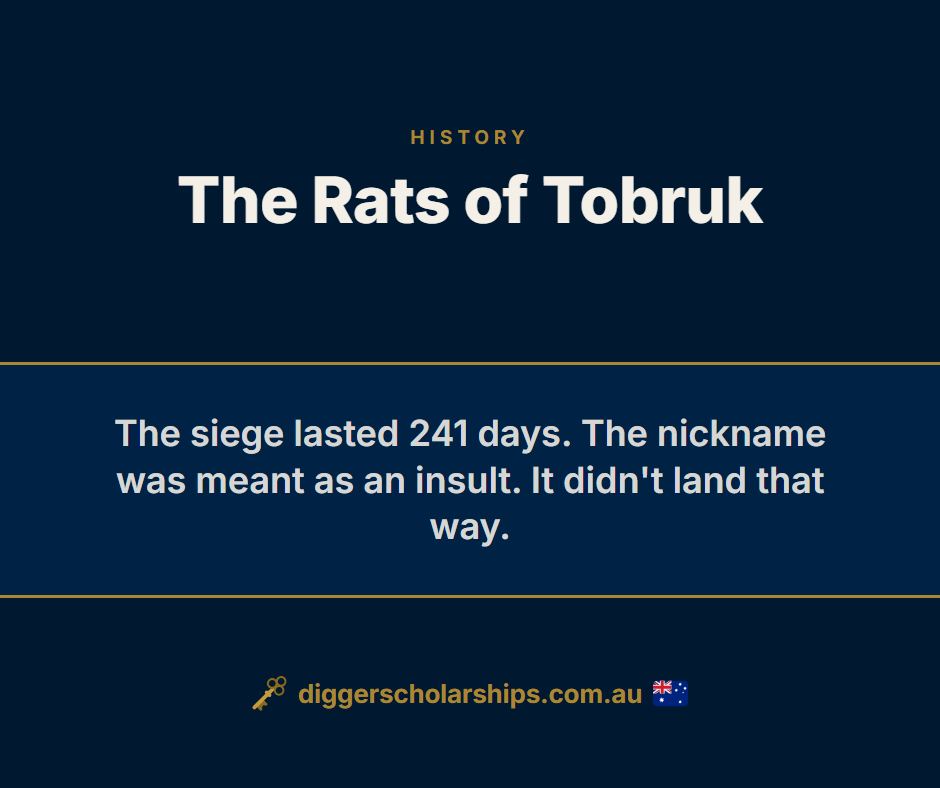
These are real posts from the year we scheduled - one theme per weekday, same grid, different palette. This is the trick that makes 366 posts feel like a magazine, not a screensaver.



The maths that breaks people
Daily posting is the advice everyone gives and almost nobody sustains, because the maths is brutal. One post a day on three platforms is 1,098 posts a year. At an average of 20 minutes each, write it, design it, schedule it, that's 366 hours. Nine working weeks. On marketing admin. For a solo founder or a small team, that plan doesn't fail because of laziness; it fails because the volume was never survivable.
The fix isn't posting less. It's refusing to make 1,098 individual decisions. Batch the whole year as one project - one spreadsheet, one design session, one generation run, one upload - and the marginal cost of a post collapses to almost nothing. What follows is exactly how we did it for Digger Scholarships, an Australian education brand we run: 366 posts for Facebook, 366 for Instagram, 366 for LinkedIn - 1,098 posts across all three platforms, a year of daily presence.
Step 1
One spreadsheet is the entire content strategy
Everything downstream is generated from a single workbook. One master calendar tab (366 rows, one per day), then one tab per weekly theme. Every row carries the same fields:
- H1 - the headline that goes on the image
- H2 - the supporting line that goes on the image
- One caption column per platform - conversational for Facebook, professional for LinkedIn, line breaks and emoji for Instagram
- Date and theme - which day it posts, which design it wears
Writing 366 rows sounds enormous. It isn't, because themes make it seven small problems instead of one giant one. You're not writing "a year of content"; you're writing 52 Monday spotlights, 52 Tuesday facts, 52 Wednesday myths. Constraints are what make volume writable - and an AI assistant that knows your subject makes a strong first draft of each tab in minutes, which you then edit with your own voice and facts.
This is what the sheet looks like - one row per theme. Click any row, then look at the bottom of the sheet window: the finished-post preview down there swaps to show exactly what that row generates.
| A | B | C | D | E | F | G | |
|---|---|---|---|---|---|---|---|
| 1 | Day | Theme | H1 (headline on image) | H2 (sub-line on image) | Facebook caption | Instagram caption | LinkedIn caption |
| 2 | Mon | Spotlight | Spotlight: AVCAT Long Tan Bursaries | Up to $6,000 a year for up to 3 years. Applications open 18 August to 31 October. One of 67 in our free database. | AVCAT Long Tan Bursaries - Up to $6,000 a year for up to 3 years. One of 67 in our free database. | 🎓 AVCAT Long Tan Bursaries ⏎ Up to $6,000 a year for up to 3 years. One of 67 in our free database. Link in bio. | For families of veterans and the advisers who support them: AVCAT Long Tan Bursaries. Up to $6,000 a year for up to 3 years. |
| 3 | Tue | Did You Know | Every WWI Army record is online | Fully digitised and free at the National Archives - series B2455. No appointment, no fee, no login. | Did you know? Fully digitised and free at the National Archives - series B2455. No appointment, no fee, no login. | 💡 Every WWI Army record is online ⏎ Fully digitised and free at the National Archives - series B2455. | Every WWI Army record is online. Fully digitised and free at the National Archives - series B2455. |
| 4 | Wed | Myth vs Fact | Myth: hardship means poverty | Necessitous circumstances has six doors - financial, physical, familial, emotional, medical, environmental. One is enough. | 'Hardship means poverty' - we hear it all the time, and it isn't true. Necessitous circumstances has six doors. | 🚫 MYTH: hardship means poverty ⏎ ✅ TRUTH: Necessitous circumstances has six doors. One is enough. | A misconception we hear from families every season: hardship means poverty. The reality: there are six doors, and one is enough. |
| 5 | Thu | How-To | Start with a name search | RecordSearch at the National Archives. Surname first. It's free and takes two minutes. | Start with a name search: RecordSearch at the National Archives. Surname first. It's free and takes two minutes. | 📌 Start with a name search ⏎ RecordSearch at the National Archives. Surname first. Free, two minutes. ⏎ Save this for school holidays. | Practical tip for veteran-descendant scholarship applicants: start with a name search at the National Archives. |
| 6 | Fri | Deadline | Year 12? Start now | Research the family service story this term, and every scholarship season ahead gets easier. | 📅 Year 12? Start now. Research the family service story this term, and every scholarship season ahead gets easier. | ⏰ Year 12? Start now ⏎ Research the family service story this term. ⏎ Dates, filters and eligibility - link in bio. | A date for families and careers advisers: Year 12? Start now. Research the family service story this term. |
| 7 | Sat | History | The Rats of Tobruk | The siege lasted 241 days. The nickname was meant as an insult. It didn't land that way. | The Rats of Tobruk. The siege lasted 241 days. The nickname was meant as an insult. It didn't land that way. | The Rats of Tobruk ⏎ The siege lasted 241 days. The nickname was meant as an insult. It didn't land that way. ⏎ Whose story does your family carry? | The Rats of Tobruk. The siege lasted 241 days. Australian service history, one story at a time. |
| 8 | Sun | Family | Ask about the photo on the wall | Every family has one - uniform, young face, no caption. This week, ask who it is. | Sunday prompt: Every family has one - uniform, young face, no caption. This week, ask who it is. | Ask about the photo on the wall 🌿 ⏎ Every family has one - uniform, young face, no caption. ⏎ #DiggerScholarships | A weekend prompt for families: Every family has one - uniform, young face, no caption. This week, ask who it is. |

Row 2 becomes…
Mon · Spotlight
The H1 and H2 you can see in the row are the exact text on the image. The three caption cells post beside it on each platform. Nothing else is needed - no design step, no copy-paste, no decisions on the day.
Step 2
One grid, seven palettes - the anti-wallpaper trick
The most common objection to batching: "366 posts from one template will look like wallpaper by week three" and you'd be correct in thinking that. The fix isn't seven different designs - that shatters the brand. It's one master layout with a palette shift per weekday - a strikethrough motif on myth-busting Wednesdays, a "SAVE THIS" corner tag on how-to Thursdays, a big serif headline on deadline Fridays.
Design the flagship variant first, get the spacing perfect, then duplicate and recolour six times using the brand book. Change only colours - never the grid, never the fonts. The consistency is what keeps it on brand.
Here are all seven templates side by side, empty. Every one has the same two text boxes - {H1} and {H2} - and Bulk Create simply fills each spreadsheet row into them:
Mon
Tue
Wed
Thu
Fri
Sat
Sun
That's the whole trick. Seven thumbnails, two text boxes, zero decisions per post. Scroll back up to the gallery and you'll see the same seven frames filled in: unmistakably one brand, never the same day twice.
Step 3
Generate the posts - use the templates
366 designs × three platform sizes = 1,098 images. Nobody makes those by hand. There's two main ways to do it. Here's how:
- Canva Bulk Create
- if you've ever played Go Fish with the kids, you already have the skill: it's two matches and a
"go fish". Match the H1 column to the H1 text box, match H2 to H2, then Go (the button says
Generate). That's it - a theme's whole batch in one run.
Canva's own Bulk Create guide is here.
Three traps we hit:
- Line breaks inside spreadsheet cells silently break the import - keep every cell to a single line.
- Each run caps out around 300 rows, so run one theme at a time.
- Don't generate once and resize per platform - Canva's resize needed more tweaking than it saved. Make a template each for Facebook, Instagram and LinkedIn and bulk-create each one. Three quick runs beat one run plus an afternoon of nudging text boxes.
The batch map: 21 small runs, not one giant one
Mon · Spotlight FB template · 52 IG template · 52 LI template · 52Tue · Did You Know FB template · 52 IG template · 52 LI template · 52Wed · Myth vs Fact FB template · 52 IG template · 52 LI template · 52Thu · How-To FB template · 52 IG template · 52 LI template · 52Fri · Deadline FB template · 52 IG template · 52 LI template · 52Sat · History FB template · 52 IG template · 52 LI template · 52Sun · Family FB template · 52 IG template · 52 LI template · 527 themes × 3 platform templates × 52 weeks - 21 bulk-create runs, every one comfortably under the 300-row cap.
- An AI assembly line
- Anthropic's newest model, Claude Fable 5, orchestrated Opus agents to deliver: one
agent rendered every image straight from the spreadsheet through a headless-browser template, a second
independent agent QC'd every batch against the source data, and a human (hi) spot-checked the results.
The QC pass earned its keep: it caught "1 weeks left" typos in three posts before they went
out, traced them back to the spreadsheet, and fixed both.
We split the year across both methods deliberately - the first themes through Canva, the rest through the assembly line - to road-test each and report back honestly. Both work. Canva costs nothing and needs no technical setup; the assembly line scales further and QCs itself.
Our verdict
With unlimited tokens and all things being equal, our preference is for Claude Fable to generate - but only after we have created the templates and the Excel. The IP is the important part; the admin can be outsourced.
Full disclosure: PM Project Change runs a Claude Max plan. Usage limits on Fable are significantly higher than the Pro tier, and a year of image generation leans on that headroom.
Either way, the principle is the same: the spreadsheet is the source of truth, and images are generated from it - never edited individually. If a post is wrong, you fix the row and regenerate.
The pipeline
From one spreadsheet to 366 days on autopilot
Step 4
Host the images where a CSV can reach them
Here's the step nobody warns you about. Bulk schedulers don't want image files... they want public image URLs in a CSV column. Your 1,098 images need to live on the open internet before you can schedule anything.
We used a Supabase storage bucket
- and the free tier easily covers this job: a year of post images is about 60MB against a 20GB cap.
If you've never touched it, it's less scary than it sounds:
- Create a free Supabase account and a new project.
- In the left menu, open Storage and create a bucket. Mark it public - that's what makes the image URLs shareable.
- Inside the bucket, create one folder per theme per platform (e.g.
facebook-theme1,instagram-theme1). - Drag each batch of images into its folder. That's the whole upload.
- Click any file and copy its public URL - every other URL follows the same pattern.
Name the files to a strict convention before you upload
(DS-FB-DYK-007.png = brand · platform · theme · sequence). The
convention is the whole game - when file names are predictable, the URLs are predictable,
which means the CSVs in the next step can be generated instead of typed.
Step 5
One CSV per platform
From the master spreadsheet, generate one CSV per theme per platform: caption, year, month, day, hour, minute, image URL. Small files beat one monster - if an import fails, you lose one theme on one platform, not the year.
One note before you build anything: every scheduler provides its own CSV template, with its own column names and order. Download it from inside your tool and complete it exactly as required - the example below shows the shape, not your scheduler's exact columns.
Nothing in the curly braces is magic - they're the bits you replace with your own names:
| A | B | C | D | E | F | G | H | |
|---|---|---|---|---|---|---|---|---|
| 1 | Caption text | Year | Month | Date | Hour | Minutes | Post Type | Media URL (public image link) |
| 2 | {Your Facebook caption for post 1} | {YYYY} | {M} | {D} | 9 | 0 | Post | https://{your-project}.supabase.co/storage/v1/object/public/{bucket}/{theme}-fb/{BRAND}-FB-{Theme}-001.png |
| 3 | {Your Facebook caption for post 2} | {YYYY} | {M} | {D} | 9 | 0 | Post | https://{your-project}.supabase.co/storage/v1/object/public/{bucket}/{theme}-fb/{BRAND}-FB-{Theme}-002.png |
| 4 | {Your Facebook caption for post 3} | {YYYY} | {M} | {D} | 9 | 0 | Post | https://{your-project}.supabase.co/storage/v1/object/public/{bucket}/{theme}-fb/{BRAND}-FB-{Theme}-003.png |
The highlighted column is the one people miss: it must be a public URL from Step 4, not a file on your computer. One CSV like this per platform - the caption column and the -fb / -ig / -li folder swap per platform, everything else stays.
Step 6
Verify, then schedule
The step that separates systems from gambles: health-check every image URL before uploading a single CSV. A script that pings all of them takes seconds. Ours came back 755 green, 46 red - one folder had simply been missed during upload. Two minutes to fix before scheduling; a week of broken image posts if we'd found out after. Verify, then schedule. Always in that order.
Then pick a scheduler that takes CSV bulk uploads:
- Content360
- what we used. It happily scheduled a year of posts per platform, and at the time of writing it has
a lifetime deal (one payment, no subscription) - which suits this system perfectly, since the whole
point is scheduling a year ahead.
-


 Buffer, SocialBee, Metricool
- all take similar CSV bulk uploads on subscription plans. Same system, different vehicle - check
each one's cap on how far ahead it will schedule.
Buffer, SocialBee, Metricool
- all take similar CSV bulk uploads on subscription plans. Same system, different vehicle - check
each one's cap on how far ahead it will schedule.
Step 7
The scheduled year is the skeleton, not the strategy
The standard objection to scheduling a year ahead is real: feeds need room for the topical, the newsworthy, the human. So leave it. The scheduled year is your floor, not your ceiling - roughly 80 per cent of output, guaranteed to show up every single day whether you're inspired, busy, or having a terrible week. The other 20 per cent you post live: reactions, wins, behind-the-scenes, anniversaries that matter this week.
That's the actual mental-health trade at the heart of this whole system. Daily posting puts a decision in front of you 366 times a year. A scheduled skeleton means the machine posts at 9am whether you're feeling brilliant or meh - and everything you add on top is a bonus, not an obligation.
Or skip all seven steps
Want the year done for you?
One week from now, your brand could be showing up daily on every platform - on brand, on time, building authority by design. Consistency is what builds trust: your audience starts getting the same quiet signal from you at the same time every day... the kind of posts people save and come back to. It's no accident that marketing research links consistent brand presentation to revenue lifts of 23-33 per cent.1
That's the 80 per cent of your brand, handled - the machine in this article, built and delivered for you at a flat rate by the team that wrote it. You keep the 20 per cent where your brilliance is needed in full, and get back to running the actual business. We'd be happy to carry the rest.
1. Lucidpress (now Marq), State of Brand Consistency - surveyed organisations attributed average revenue growth of 23 per cent to consistent branding in the 2016 report, rising to 33 per cent in the 2019 update.
Receipts
This isn't a thought experiment - it's running right now
The live example
Digger Scholarships
The brand this system runs: a free database of 67 scholarships for descendants of Australian service members. Every post you saw in the gallery above is live on its Facebook, LinkedIn and Instagram right now - posted daily by the machine, watched over by a human.
diggerscholarships.com.au →The product behind it
Decode My Digger
Where the content strategy points: a tool that turns a 30-page Australian military service record - the abbreviations, the stamps, the copperplate - into the family's story in plain language. $59, about 15 minutes.
decodemydigger.com.au →The questions everyone asks
How far in advance should you schedule social media posts?
The standard advice is two to four weeks for most content, and that is right for anything tied to trends or news. But evergreen content - tips, education, history, brand themes - can safely be scheduled up to a year ahead. The practical answer is to split your content in two: an evergreen skeleton scheduled twelve months out, and a live layer of topical posts you add week to week on top of it.
Is it bad to schedule a whole year of content at once?
Only if you do it naively. The two real objections are that batched content turns into wallpaper (identical posts every day) and that you lose room for timely posts. Both have fixes: use one master layout with a different palette and format per weekday so the feed stays visually alive, and treat the scheduled year as roughly 80 per cent of your output, with the other 20 per cent posted live when something topical happens. The scheduled skeleton removes the daily what-do-I-post pressure; it does not forbid you from posting.
How long does it take to create a year of social media content?
With the system in this article: one focused planning session to write a spreadsheet of 366 posts (headline, sub-line and per-platform captions), about an hour to design one master template and recolour it per weekday theme, a few hours of automated image generation and QC, and an evening of uploading and CSV scheduling. We scheduled 366 posts each for Facebook, LinkedIn and Instagram - 1,098 in total - in a weekend plus a Monday. Allow three to five focused days if you are doing it for the first time.
How do you bulk schedule posts with images from a spreadsheet?
Most bulk schedulers accept a CSV where each row has the caption, the date and time, and a public image URL. The trap is the image URL: the images must already live somewhere on the public internet. Host them in a free storage bucket (we used Supabase), use a strict file naming convention so the URLs are predictable, then generate one CSV per platform from your master spreadsheet. Always health-check every URL before you upload the CSV - one broken link is annoying, three hundred are a nightmare.
What is the cheapest way to run a year of scheduled social media?
Genuinely cheap: a spreadsheet you already have, Canva's free tier or an AI assistant for artwork, Supabase's free tier for image hosting (well under the 20GB cap - a year of post images is roughly 60MB), and a bulk scheduler. The scheduler is usually the only paid piece. No agency, no retainer, no content subscription.
How do you stop batched content looking identical?
One grid, seven palettes. Keep the same layout, type system and footer on every post, but give each weekday its own theme and colour treatment - a navy spotlight on Monday, a cream fact card on Tuesday, a myth-versus-fact format on Wednesday, and so on. The feed reads as unmistakably one brand, but no two consecutive days look the same. It also makes a beautiful repeating pattern on an Instagram grid.
Should you post the same thing on Facebook, LinkedIn and Instagram?
Same artwork, different words. Resize the image per platform (landscape for Facebook, portrait 4:5 for Instagram, square for LinkedIn) and write the caption for the room: conversational for Facebook, professional framing for LinkedIn, line breaks and emoji for Instagram. Keep all of it in one spreadsheet with a caption column per platform so the whole set generates together.
This is process design. It just happens to be marketing.
One spreadsheet, a naming convention, a QC gate and a verification step turned nine working weeks of content admin into three days. That's not a marketing trick - it's what PM Project Change does to any repetitive process that's eating a team alive.
More from PM Project Change: free tools · the blog