Blog › Project Governance
Why Your RAID Log Needs
Three More Letters
Traditional separate artefacts work well in mature PMOs. Here's how to upskill executives new to PMO without overwhelm - one workbook, one dashboard, one source of truth.
The overwhelm problem
All project managers run a RAID log. Risks, Assumptions, Issues, Dependencies. It's the minimum viable governance artefact for any project.
But RAID on its own assumes everyone at the table already knows what governance looks like. When you're onboarding a new executive sponsor, bringing a client into a PMO for the first time, or standing up governance in an organisation that has never had it - four categories aren't enough, and four separate spreadsheets are too many.
Picture this. You're three weeks into a new engagement. Your sponsor has never worked inside a PMO before. You send them a RAID log, an Actions tracker, a Decisions register, a Change Request log, and a Lessons Learned template. Five separate files. Five different formats. Five sets of column headers that mean slightly different things depending on who built them.
Your sponsor opens the first one, skims it, and never opens the others. Governance becomes something that happens to them rather than something they participate in. And when something goes wrong six months later, the audit trail is scattered across files nobody maintained.
This isn't a competence problem. It's a design problem. We ask people to engage with governance across too many artefacts, and then wonder why they disengage.
The fix is consolidation, not simplification
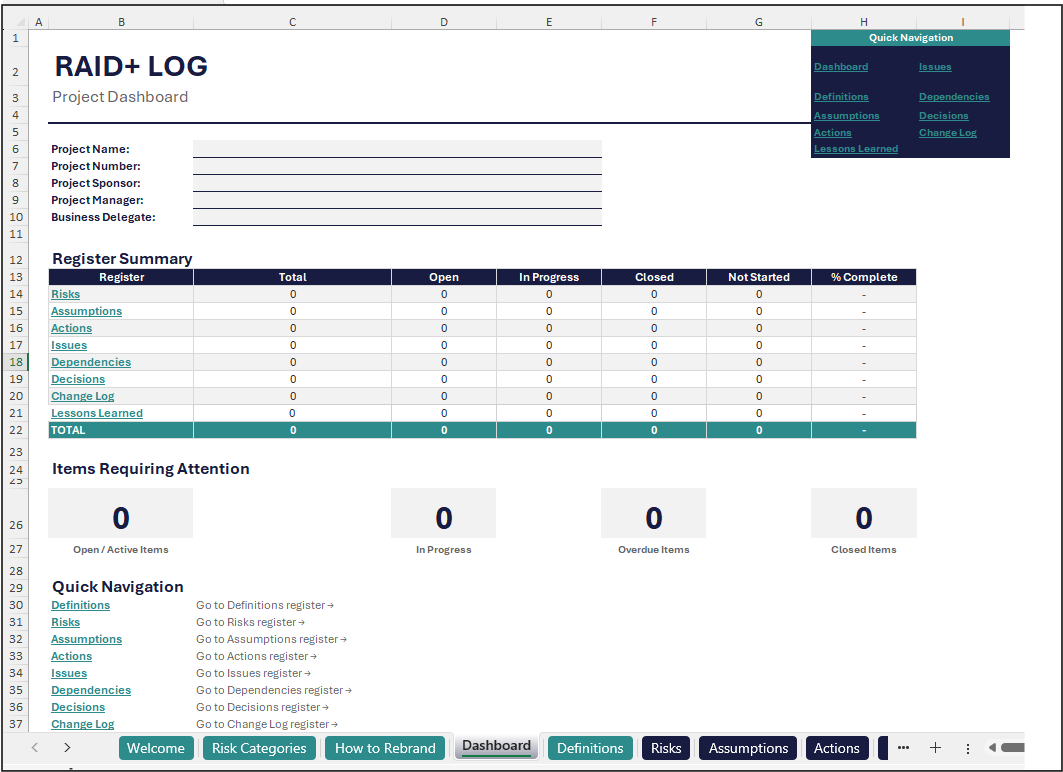
One workbook. One dashboard. One tab per register.
The answer isn't to strip governance back to just RAID. You still need to track actions, decisions, and change requests - dropping them would leave gaps that come back to bite you at steering committee. The answer is to bring everything into one place with a single entry point.
That's what RAID+ does. One workbook. One dashboard. One tab per register. Your sponsor opens one file, sees the dashboard, and immediately understands the state of the project. When they need detail, they click through to the relevant tab. When they don't, the dashboard tells the story.
What RAID+ covers
The original four, plus three additions and Lessons Learned. All in one workbook.
RAID+ extends the standard RAID framework with three additional registers and a Lessons Learned capture. The original four stay exactly as they are - the additions slot in alongside them without changing how you work.
The original four
Risks
PMBOK: An uncertain event or condition that, if it occurs, has a positive or negative effect on one or more project objectives.
What might go wrong (or right). Each risk carries a probability, impact rating, and mitigation strategy. The risk register is where your project's uncertainty lives - visible, assessed, and owned.
Assumptions
PMBOK: A factor in the planning process considered to be true, real, or certain, without proof or demonstration.
What you're taking for granted. Every project runs on assumptions - about budget, timelines, resource availability, stakeholder support. When an assumption turns out to be wrong, it usually becomes a risk or an issue. Better to track them before that happens.
Issues
PMBOK: A current condition or situation that may have an impact on the project objectives.
A realised risk. When a risk event actually occurs, it becomes an issue. Log, prioritise, escalate, resolve. Issues aren't hypothetical - they're happening now and need someone on them.
Dependencies
PMBOK: A logical relationship between two activities or between an activity and a milestone.
The map of what is blocking what. Where one task, deliverable, or external party relies on another to proceed. Dependencies are the reason your Gantt chart has arrows - this register makes them explicit outside the schedule.
The original four - RAID
Risks
Uncertain event affecting objectives
Probability, impact, mitigation. Visible, assessed, owned.
Assumptions
Factor considered true without proof
When wrong, becomes a risk or issue.
Issues
A realised risk requiring action
Log, prioritise, escalate, resolve.
Dependencies
Logical relationship between activities
The map of what is blocking what.
The RAID+ additions
Three more registers, plus Lessons Learned. Same workbook.
Actions
The to-do list that sits alongside the schedule. These are the specific actions agreed in meetings, workshops, or steering committees - who is doing what, by when, and what the current status is. Distinct from the project schedule because they capture commitments made in real time. Assign it, track it, close it.
Decisions
A formal record of decisions made during the project. Who made the decision, when, what the alternatives were, and what the rationale was. Without a Decisions register, this information disappears into meeting minutes that nobody reads - and six months later, nobody can explain why a particular direction was taken.
Change Requests (CR)
The summary register for the formal Change Request process. Every modification to scope, schedule, or budget that goes through the CR process is logged here with its status, impact assessment, and approval outcome. This is scope change tracking, not change management - it's the audit trail that tells the story of how the project evolved from baseline.
Lessons Learned
Captured throughout the project - not just at the end. What worked, what didn't, and what you would do differently. This is the register that most teams skip until close-out and then rush through in thirty minutes. Building it into the same workbook means it's always one tab away.
The RAID+ additions
Actions
Assign it, track it, close it. The to-do list alongside the schedule.
Decisions
Who decided, when, alternatives, rationale. The audit trail minutes lose.
Change requests
Scope change tracking, not change management. Status, impact, approval.
Lessons learned
Captured throughout, not just at close-out. What worked and what didn't.
When to consolidate (and when not to)
RAID+ is the right tool in these four situations.
Standing up a new project
No existing PMO artefacts. Governance operational on day one, not week six.
Onboarding new stakeholders
Executive sponsors or clients new to project governance. One file to open, not five.
Tool procurement is slow
When getting Jira or ServiceNow approved takes longer than the project itself.
One source of truth needed
Teams that need one place to look, not seven. Reduce cognitive load, increase compliance.
If your organisation already has mandated templates in Jira, ServiceNow, Monday, or similar - check with your PMO lead before consolidating. RAID+ is designed to complement or replace spreadsheet-based tracking, not to override an existing integrated toolset.
Benefits
What you get from one workbook over five separate files.
Reduces stakeholder overwhelm
One workbook, one dashboard, one source of truth. Your sponsor opens one file and sees the full picture.
Builds governance capability
Stakeholders learn the categories by using them, not by reading a framework document.
Faster stand-up
Governance is operational on day one. No waiting for tools to be procured or configured.
Audit-ready from day one
Every item has an ID, owner, date raised, target date, and status. Nothing lives in email.
Tool-agnostic
Works in Excel desktop, Excel Online, and Google Sheets. No macros, no logins, no subscriptions.
No expiry, no dependencies
Download once, use forever. No platform lock-in. No subscription to cancel when the project ends.
How to build one
Three principles. One output.
Keep It Simple
One dashboard tab. One tab per register. No macros, no VBA, no dependencies on tools your team might not have.
Consistent structure
Every item gets an ID, owner, date raised, target date, and status. Same columns, every register.
Dashboard pulls it together
Your sponsor sees the full picture without opening seven tabs. Detail is one click away when needed.
You have been told "just use a spreadsheet" - so use a good one. Structure it properly from the start and it will carry you through delivery, audits, and lessons learned with everything in one place.
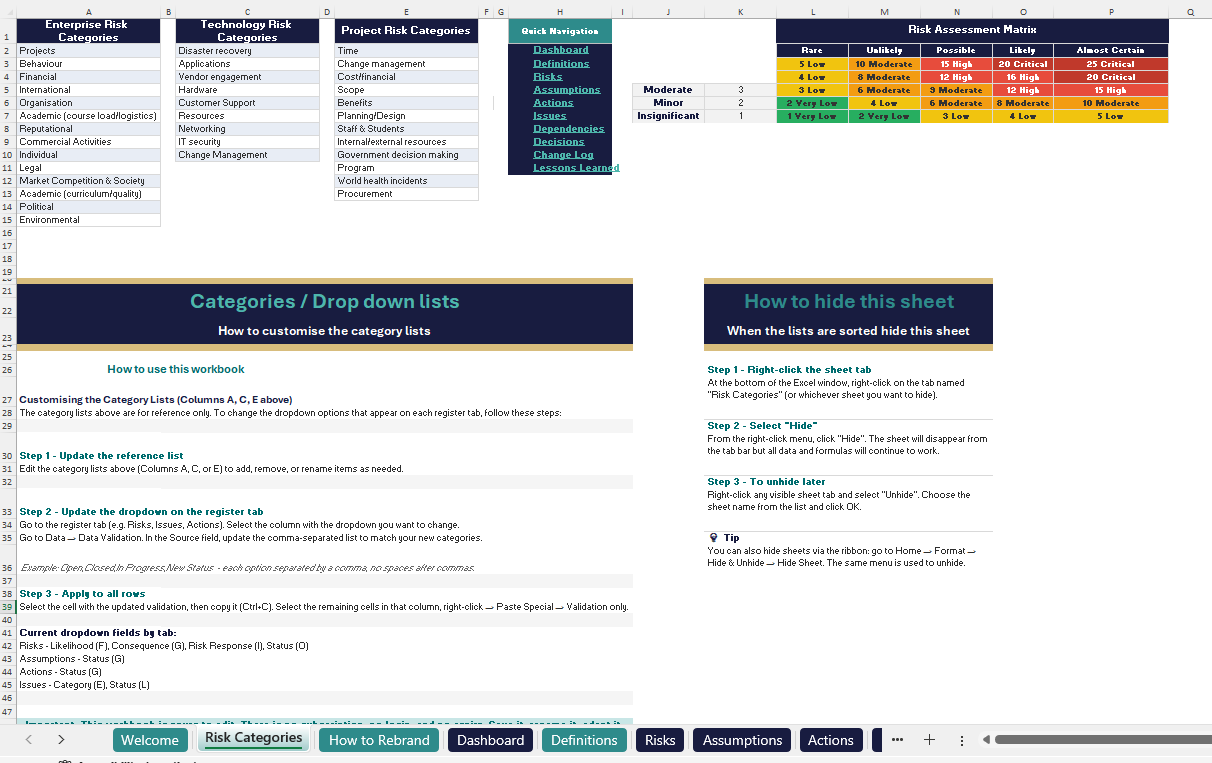
If you would rather not build it from scratch, the RAID+ workbook has all eleven sheets, a dashboard, conditional formatting, and a definitions guide - ready to download and use today.
Get the RAID+ template
Eleven sheets. Dashboard. Conditional formatting. Definitions guide. Ready to use today.
Launch price $29 AUD — then $39 AUD
Get the RAID+ template - $29 AUD